What Does Enterprise-Grade Rack Infrastructure Include?
Enterprise-grade rack infrastructure is more than a cabinet with servers in it. It is the physical foundation for the network, compute, storage and security systems an organisation relies on every day. When that foundation is poorly planned, the results can include outages, difficult fault-finding and security blind spots. When it is designed properly, equipment is easier to protect, maintain and expand.
That matters because cybersecurity does not begin and end with software. Firewalls, endpoint detection platforms and access controls all depend on trustworthy connections between devices. Those connections run through racks, patch panels, switches, power systems and cabling. A failed link can interrupt operations; an undocumented or unauthorised link can also undermine security controls.
So, what should an enterprise rack include? The short answer is a suitable enclosure, well-managed cabling, correctly specified power and cooling, capable switching, physical security, clear documentation and a plan for maintenance. The right design depends on the site, the equipment and the consequences of failure. The practical test is simple: can someone understand the rack, support it safely and respond when something goes wrong at 2am?

Start with the rack and its environment
The rack itself must suit the equipment it will hold and the room it will occupy. That means checking rack height and depth, equipment weight, mounting requirements, door clearance and access for installation and maintenance. A cabinet that is technically large enough may still be a poor choice if its doors block a walkway or there is no room to remove a server.
Consider the environment around the cabinet, too. Equipment needs a dependable airflow path, appropriate temperature and humidity conditions, and enough space for technicians to work without pulling out unrelated connections. In larger or higher-density installations, cooling design should account for equipment heat output and the room’s air distribution—not just the air-conditioner’s advertised capacity.
Physical access is another design decision. A locked cabinet in a controlled room can reduce WiFi 7 access points the chance of casual tampering, but locks are only useful if keys, access rights and entry records are managed. Where equipment supports critical business or operational functions, define who can enter, how access is authorised and what happens during an emergency.
Cable management: operational hygiene and security control
Cable management is not about making a rack look tidy for a photograph. It is about keeping connections traceable, preserving airflow, reducing strain and making changes safer. Dense bundles, tight bends and cables stretched across equipment can obstruct ventilation or place pressure on connectors. A poorly dressed cable can be disturbed during routine work and cause an avoidable outage.
Use suitable vertical and horizontal cable managers, keep power and data cabling organised according to the site’s design, and avoid overfilling pathways. Choose cable types and lengths that match the route rather than coiling excess cable behind equipment. Leave adequate slack for servicing, but not so much that it turns into a nest of mystery cables.
Labelling is essential. Label both ends of each cable with a consistent identifier that maps to the rack layout and documentation. Labels should be durable and readable in the actual conditions of the site. Colour can help distinguish cable purpose, but it should support—not replace—written identifiers. A colour scheme nobody has documented becomes another guessing game.
This discipline supports security as well as maintenance. If teams cannot tell which connection leads to a firewall, a management interface or an operational technology (OT) device, they may disconnect the wrong link or patch a device into an inappropriate network. Clear cable management reduces the opportunity for accidental bypasses and makes unauthorised changes easier to spot.
Patch panels: structured connections, not decorative hardware
Patch panels provide an organised termination point for fixed cabling. Instead of running every permanent cable directly to a switch, installers terminate the building cabling at panels, then use short patch leads to connect selected ports to network equipment. This makes moves, adds and changes more manageable and helps separate in-building cabling from equipment that may be replaced.
Patch panels only deliver those benefits when their ports are labelled, documented and used consistently. The panel label should correspond with the outlet, cable route or other identifier in the site records. Teams should know which panel ports are active, where they terminate and which switch ports they connect to. Spare ports should be clearly identified rather than left as unexplained connections.
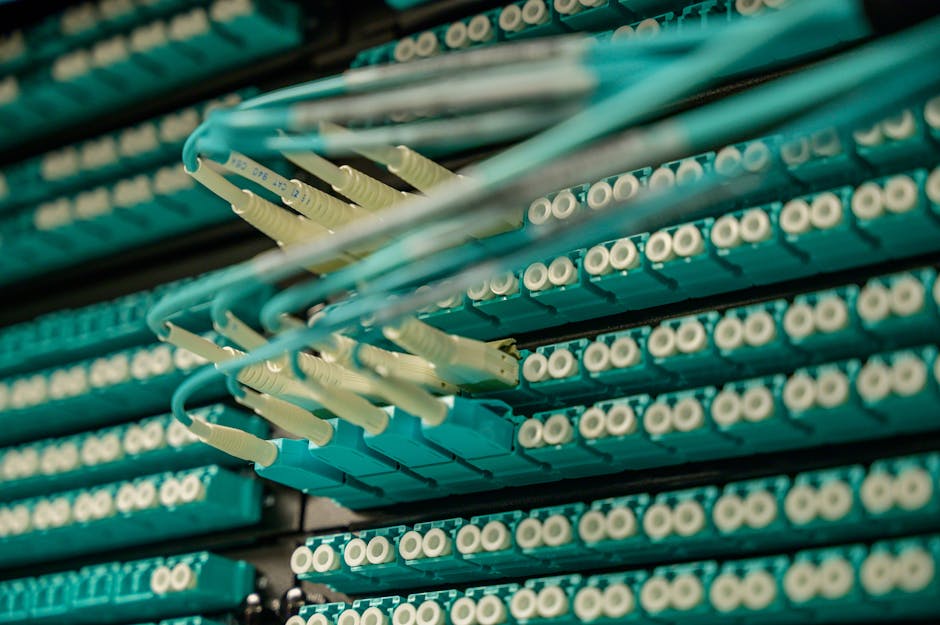
Good practice also includes testing and recording installed links, using appropriate category and fibre components, and maintaining bend radius and separation requirements. Patch panels do not make a network secure by themselves. They do make the physical layout more legible—which is a valuable security property when someone needs to verify a path or investigate an unexpected connection.
Switching and segmentation belong in the rack design
Segmentation is often discussed as a configuration task, but it depends on capable switching and sound physical design. Switches need the features, capacity and resilience required for the intended architecture. The design may include separate VLANs and routing boundaries for corporate users, servers, guest access, management and OT, with policy enforced at appropriate control points.
Hardware selection should be based on actual requirements: port count, uplink capacity, power over Ethernet needs, redundancy, management features, environmental conditions and expected growth. A manufacturer such as Cisco may be appropriate for enterprise switching in one environment; in an industrial setting, ruggedised equipment from a vendor such as MOXA may better suit temperature, vibration or mounting constraints. The important point is to assess the use case, support model and security capabilities—not simply the logo on the front.
In some designs, Garland switches and network taps are used to support traffic visibility and monitoring. Their role should be specified as part of the architecture, including where traffic is mirrored or tapped and how monitoring components are protected. Visibility hardware can help defenders understand what is happening on a network, but it does not replace segmentation or access controls.
Switch placement and cabling must align with the logical design. If separate network zones are intended, the physical connections, uplinks and patching process should make that design understandable and difficult to undermine by accident. Management interfaces deserve particular care: keep them on appropriately restricted management networks, limit who can reach them and avoid exposing them through ad hoc connections.
Power, resilience and what happens during a failure
Reliable rack infrastructure needs power designed for the load and the consequences of interruption. That includes suitable circuits, correctly rated power distribution units (PDUs), safe cable routing and clear identification of supply paths. Where resilience is required, dual power supplies should connect to genuinely independent feeds where possible. Two plugs connected to the same overloaded circuit do not provide meaningful redundancy.
Uninterruptible power supplies (UPSs) can bridge short interruptions and support an orderly shutdown, but they need appropriate sizing, monitoring and battery maintenance. Define which equipment is backed up, how long it must run and what action follows when runtime is nearly exhausted. Test the plan; do not assume that a battery warning will reach someone who can respond.
Ask the 2am question: if a PDU fails, can the on-call engineer identify which devices are affected? If a power feed is lost, is the remaining path sufficient? Are replacement components available, and can they be installed without disconnecting unrelated systems? These are design questions, not details to leave until an incident.
Physical security and operational visibility
Racks should be placed in controlled spaces, with access appropriate to the sensitivity of the systems inside. Depending on risk and site requirements, controls may include locked rooms or cabinets, access logging, visitor procedures, CCTV and Go to the website environmental monitoring. The goal is to deter unauthorised access and provide useful evidence when investigating an incident.
Monitoring should cover more than server health. Temperature alerts, UPS status, power conditions and network link state can expose developing faults before they become major outages. Where practical, monitor the infrastructure that supports monitoring itself. A dashboard is less useful if the switch carrying its telemetry has failed silently.
Physical faults can also create security blind spots. A damaged link, unstable switch port or accidental bypass may interrupt logs, telemetry or traffic inspection. If a sensor stops receiving mirrored traffic, for example, the organisation may lose visibility without noticing. A resilient design includes checks that monitoring feeds are still present and that alerts reach the right team.
How rack infrastructure supports cybersecurity
Firewalls and endpoint detection platforms are important controls, but they rely on the underlying network being correctly connected and maintained. A firewall cannot enforce a boundary if traffic has been patched around it. An endpoint platform cannot provide reliable coverage if a device has been moved to an unmanaged network or its connection has become unstable.
This is why physical infrastructure is part of cybersecurity, not a separate facilities concern. Unauthorised access to a cabinet may enable someone to unplug equipment, connect a rogue device or alter a network path. Poor documentation can make those changes hard to identify. A flat network, meanwhile, leaves fewer barriers if a device is compromised.
Australian organisations should consider their rack and network foundations alongside applicable Australian Cyber Security Centre (ACSC) guidance and their own risk and compliance obligations. ACSC guidance addresses security outcomes that depend on sound network design, access control, monitoring and secure configuration. No single cabinet layout guarantees compliance, and specific obligations vary, but sound physical and network foundations make those outcomes more achievable.
Documentation, standards and maintainability
Documentation should describe how the rack is intended to work, not merely how it looked on installation day. Keep an up-to-date rack elevation, port and patch-panel schedules, cable identifiers, power-feed information, equipment inventory and network diagrams. Record changes through an agreed process so that the diagrams remain useful after upgrades and emergency repairs.
Define how technicians will work in the rack: which ports are reserved, how temporary links are handled, how changes are approved and how old cabling is removed. Unused equipment and abandoned leads should not accumulate indefinitely. If a temporary connection must remain, label it, record its owner and set a review or removal date.
Standards and procedures should be practical enough to follow under pressure. A clear labelling convention and change process are more useful than a large document nobody can find. Review the records after significant changes and periodically verify that the physical rack matches the network diagrams.
Enterprise rack infrastructure checklist
Area What to verify Cabinet and room Suitable size, load rating, access, airflow and physical security Cable management Supported routes, readable end-to-end labels and no obstructed airflow Patch panels Tested links, consistent port identifiers and current termination records Switching Capacity, support, management security, resilience and segmentation fit Power Load calculation, labelled feeds, suitable PDUs and tested UPS arrangements Monitoring Alerts for power, temperature, device health and loss of security visibility Documentation Current rack elevations, diagrams, inventory and a controlled change processBuild for the next change—and the next incident
Enterprise-grade rack infrastructure is a coordinated system: cabinet, cabling, patch panels, switching, power, cooling, physical security and documentation all work together. Weakness in one area can undermine the rest. Good cable management makes changes safer; suitable switching supports segmentation; resilient power helps maintain availability; and accurate records help responders understand what is connected and where.
Plan around the organisation’s real operating conditions, including growth, maintenance windows and failure scenarios. Test the important assumptions, keep the labels and diagrams current, and remove unmanaged equipment from production. At 2am, the engineer responding to an outage should not have to guess which cable matters. If the rack is clear, controlled and documented, that is one less mystery to solve—and one less avoidable risk in the network.